Designer – Vector Group – Vcarve Suite
The Vector Group feature, included in the Vcarve Suite, allows users to create vector pockets two different bits for the edge and interior area of vector shapes.


The Vector Group feature, included in the Vcarve Suite, allows users to create vector pockets two different bits for the edge and interior area of vector shapes.
The Pocket Region tool utilizes a selected bit to rout out a designated region (closed vector shape) at a single set depth to spiral in or out a pocket with no islands.
This tutorial covers the basics of laying out a simple project to get familiar with the user interface and essential tools.
This tutorial expands on the project in part 1 by adding a background and learning about project optimization.
This video covers how to design a basic sign and optimize it for carving.
The warp tool allows for the bending and warping of objects in Designer.
Create with the ease and power of Designer and compile G-code for use with any CNC machine. The demo of Designer will allow users to compile the Decorative Ornamental Box project as a free trial.
The EdgeDetect process ensures accurate indexing of your board edges for the quick project positioning. This process will appear between the board positioning and load bit screen where it asks for the actual bit.
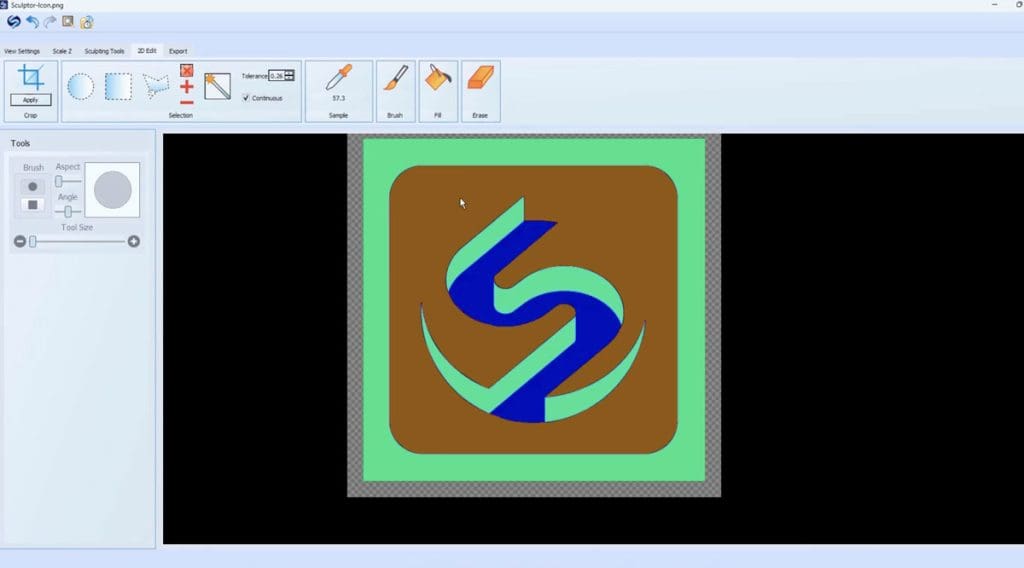
Sculptor 2 includes a set of basic 2D editing tools. The 2D view adds another dimension to the powerful capabilities of Sculptor. There are a set or selection tools for selecting areas for masked editing. These include a rectangle, circle, and polygon drawing tools as well as a magic wand. Use the 2D brush, fill,
Designer’s merge tools allow multiple surfaces to be combined in a variety of compound surfaces. There are three types; Merge Additive, Merge Subtractive, and Merge Additive Absolute. This video explains how each works and ends with an example of using them in application.