
If you are having issues with logging into Designer 5, and you are sure you have the correct email and password, follow the instructions below.
First check that you do not have an antivirus or firewall like McAfee, Norton, and PC Matic. If you do, you will either want to pause the service or whitelist the gui.exe process. To check if you have one of these antiviruses try clicking on your taskbars hidden icons (up arrow commonly next to internet icon).
If you do not have an antivirus or firewall causing these issues, open up your File Explorer (Finder on Mac). Go to the following directory:
C:\Users\[username]\CarveWright
Find the cwlog file in the CarveWright folder. Open the file. You will see information regarding the current Designer build (make sure it is the latest version). Further down the file, you may see a message stating “SSLError: The issuer certificate of a locally looked up certificate could not be found”. If you see this in the file, use the steps below to resolve the issue.
1. Check the PC’s date, time, and time zone are correct, then relaunch and retry. You can try turning off the Set time automatically setting and turning it back on.

2. Run Windows Update and reboot
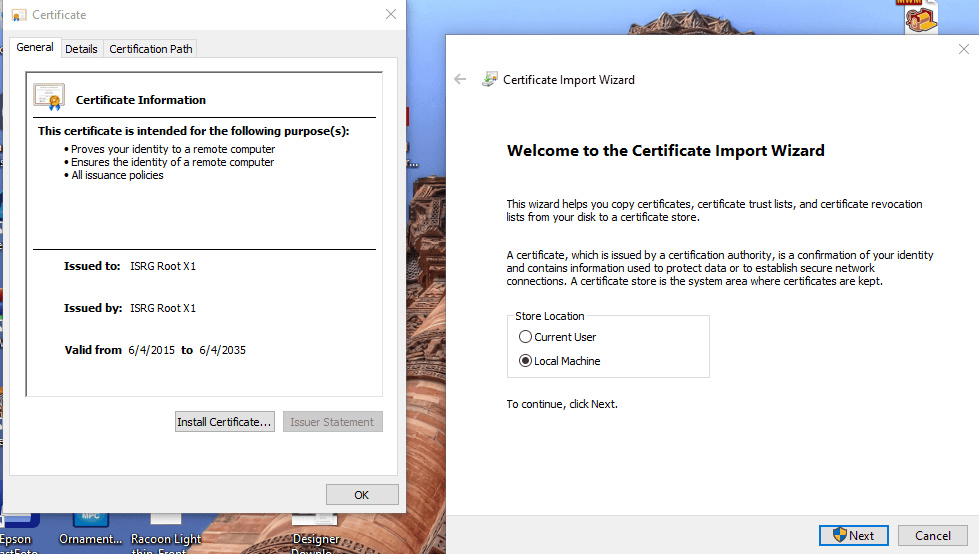
3. Manually install the root: ISRG Root X1 from https://letsencrypt.org/certs/isrgrootx1.der, double-click it → Install Certificate → Local Machine → Trusted Root Certification Authorities, then relaunch Designer.
If you need any assistance with this guide, please reach out to Support via email or voicemail.
Email: [email protected]
Phone#: 713 473 6572